https://docs.nerf.studio/quickstart/installation.html
Installation
Prerequisites: Linux Nerfstudio requires python >= 3.8. We recommend using conda to manage dependencies. Make sure to install Conda before proceeding. Windows Install Git. Install Visual Studio 202...
docs.nerf.studio
인기 철철의 Gaussian splatting을 직접 학습해보고자 한다면 만나게 되는 툴 nerfstudio. gsplat을 만날 수도 있지만 nerfstudio의 백엔드가 gsplat이라 사실 상 본체가 같고 이런저런 옵션이나 GUI를 신경 쓴다면 nerfstudio가 제인 무난한 툴이다.
하지만 위 공식 링크에서 볼 수 있다시피 document는에 11.8로 적혀있다. 이제는 5070 GPU급에서는 아예 11을 설치도 못하기 때문에 이제는 너무 오래된 버전.
따라서 CUDA 12를 사용할 때 어떻게 설치하는지 정리한다. 사실 그냥 숫자 바꾸면 된다. CUDA12.4를 예로 들겠다.
1. 현재 PC에 설치된 CUDA 버전에 맞는 pytorch 설치하기
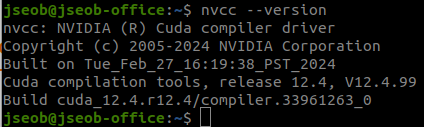
뒤에 tiny-cuda-nn이 현재 설치된 torch 버전과 CUDA 버전을 확인하기 때문에 맞춰놔야 한다. 만약 nvcc --version으로 확인했을 때 다른 버전이 나온다면 /usr/local/에 들어가 다른 버전 뭐있는지 확인하고 .bashrc 에서 스위치해주거나 새로 설치해서 원하는 버전이 나오도록 맞춰놔야 함.
2. torch, torchvision 버전 맞춰 설치
https://pytorch.org/get-started/previous-versions/
Previous PyTorch Versions
Access and install previous PyTorch versions, including binaries and instructions for all platforms.
pytorch.org
여기 가서 현 CUDA 버전에 맞는 torch를 설치한다. 나는 2.5.1 +cu124 썼다.
conda install pytorch==2.5.1 torchvision==0.20.1 torchaudio==2.5.1 pytorch-cuda=12.4 -c pytorch -c nvidia
3. cuda-toolkit도 버전 맞춰서 설치
https://anaconda.org/nvidia/cuda-toolkit?qs46XE2hNnK=Kj3Z4qj
Cuda Toolkit | Anaconda.org
2025 Python Packaging Survey is now live! Take the survey now
anaconda.org
여기 들어가면 뭔 숫자로 바꿔야되는지 나와야 있다.
conda install -c "nvidia/label/cuda-12.4.0" cuda-toolkit
4. 나머지 그대로 설치
pip install ninja git+https://github.com/NVlabs/tiny-cuda-nn/#subdirectory=bindings/torch
pip install nerfstudio

### ns-train --help 쳐보기
끝. 굳이 document만 믿고 11.8로 꾸역 꾸역 바꾸지 않아도 된다.
'Knowhow > Vision' 카테고리의 다른 글
| BlenderNeRF로 3DGS 에셋 만들기 (.blend to 3DGS .ply) (0) | 2025.07.04 |
|---|---|
| 3D Gaussian splat PLY 파일 합치기/압축하기 (How to merge/compress 3DGS PLYs) (0) | 2025.07.03 |
| Ava256, Multiface template mesh 분석 (vertex 7306 <-> vertex 5509) (0) | 2025.04.14 |
| SMPL part labeling, SMPL segmentation, SMPL 파트 나누기 (8) | 2025.04.04 |
| SMPLX uv mapping/coordinate 사용 시 유의점 (0) | 2024.11.22 |